


Published October 21, 2026
Summary
Update PHP now. Two critical flaws in PHP itself, nicknamed “php2shell,” let an unauthenticated attacker run code on a web server with a single request. PHP released fixes on October 21, 2026.
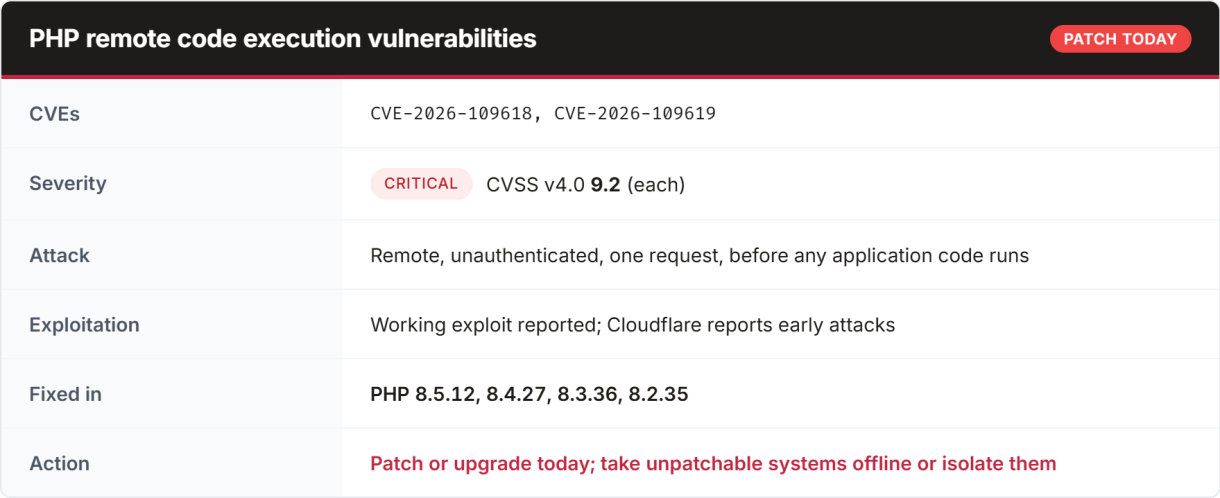
The flaws are in PHP’s core request handling, not in a plugin or framework. Every website or application built on PHP should be checked, including WordPress, Drupal, Joomla, Magento and custom apps.
Who is affected
Any server that uses PHP to serve web requests is in scope. That covers PHP-FPM, Apache with mod_php (highest risk), php-cgi, FrankenPHP and LiteSpeed.

Reports suggest the flaws may reach back to PHP 5. Treat any unpatched PHP version as vulnerable. Many older sites run end-of-life PHP, and one analysis estimates more than half of internet-facing PHP servers that show their version are on a branch with no official fix.
Immediate actions
Patching is the only full fix. PHP’s developers have said configuration changes alone will not protect you.
- Find every PHP system. List each website, server, container image and CI runner that runs PHP. Note the version actually serving web traffic (
php -von the server, or aphpinfo()page) and how PHP runs (PHP-FPM, mod_php, php-cgi). - Patch internet-facing systems first. Then internal apps, CI runners and cloud workloads.
- Install the fix the right way for your setup.
- Linux distribution packages: apply your distribution’s security update. Vendors received patches before public release, so updates may show a different version number with the fix backported.
- Debian/Ubuntu with the Sury (ondrej) repository: updated packages are available for PHP 5.6 through 8.5.
- Remi repository (rpms.remirepo.net): no update was available at release. Switch to your distribution’s packages or build from source.
- Built from source: upgrade to 8.5.12, 8.4.27, 8.3.36 or 8.2.35, or apply PHP’s backport for 7.4, 8.0 or 8.1.
- Shared hosting or managed WordPress: ask your host to confirm in writing that your PHP has been patched.
- Containers: rebuild images on a patched base image and redeploy.
- Restart PHP. Restart PHP-FPM, Apache or your application server so the patched version is loaded.
- Confirm the fix. Check the version again after the restart (see Verify and detect below).
If you can’t patch right away
The UK NCSC advises taking any system that can’t be fixed immediately offline. If that isn’t possible, use these steps to reduce risk for as short a time as possible. None of them replaces patching.
- Restrict access. Put the application behind a VPN, IP allowlist or authentication gateway so it isn’t reachable from the open internet.
- Use a web application firewall. Cloudflare has deployed rules for known exploit patterns to all customers, including free plans. Check whether your WAF or hosting provider has done the same.
- Limit file-upload requests. At the WAF or reverse proxy, block or rate-limit multipart/form-data POST requests to pages that don’t accept uploads.
- Reduce exposure. Disable PHP endpoints, sites and SAPIs you don’t use, and turn off
session.upload_progress.enabledif you don’t need it. - Plan the upgrade. For PHP 5.x and 7.x, schedule the move to a supported PHP 8 branch now. These versions will not receive further security fixes.
Verify and detect
Confirm you’re patched. After restarting, check the version PHP reports for web requests, not just the command line (php -v and the web server’s PHP can differ). Distribution packages may show an older version number with the fix backported, so check your vendor’s security advisory for the patched package version.
Hide your version. Set expose_php = Off so the X-Powered-By header doesn’t advertise your PHP version to attackers.
Look for signs of compromise, especially on systems that were exposed before patching:
- Shell, download or network tools (such as
sh,curl,wget) started by PHP-FPM or Apache worker processes - New or modified files in the web root, particularly
.phpfiles you didn’t deploy - Unexpected outbound connections from web servers
- PHP worker crashes that line up with multipart POST requests in access logs
If you find any of these, treat the server as compromised. Isolate it, preserve logs and contact your incident response provider or cyber insurer.
References
- Help Net Security: PHP2Shell vulnerabilities patched
- The Hacker News: PHP issues emergency patches
- Sury.org Debian/Ubuntu packages
This advisory reflects information available on October 21, 2026, and will be updated as details change. It is general guidance, not a substitute for advice from your IT provider or security vendor.
